The effect of direction on recursion and understanding code - Longest Common Subsequence

Today I’m going to discuss another fun and common challenge. It’s the Longest Common Subsequence a.k.a. LCS. I’ll first focus on discussing a pain point I went through when I was trying to compare the algorithm I deduced on my own vs a few other algorithms I saw online. Our algorithms seemed very similar. Yet different. It made debugging my code based on other code very difficult. This is a very common problem I face when I doing leetcode. For whatever reason my way of coding is more than often to a good extent different from what I see from others. I find it easier to compare the high level of my code with a video from Youtube since most other submissions on Leetcode itself don’t contain a good breakdown pseudocode of what’s happening. ...

An AI generated image of asteroids

Asteroids Collision

Today we’re solving https://leetcode.com/problems/asteroid-collision/ Imagine if we had the following: 1 5 3 8 6 -> -> <- <- -> Each number represents the size of an asteroid. Each asteroid is either going left or right. Bigger asteroids destroy smaller asteroids. Asteroids with same size both get destroyed. If two asteroids are going in the same direction, they don’t hit each other, because all are going in the same speed. The challenge is to return: which asteroids will remain at the end? ...

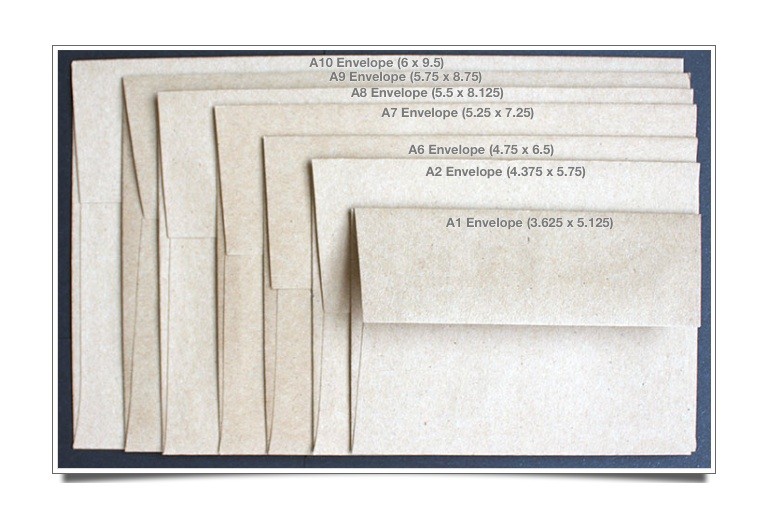
Multiple envlopes along with their width and height

How Many Envelopes Can You Fit Into Another?

Question: How many envelops can you fit into another? Each envelope has a 2D representation. [4,5] -> width = 4, length = 5 How many envelops can you fit into one another without rotating any envelopes. Bare in mind you can’t fit in two evelopes with same width or height. This is question is very much like a Russian Doll question. Which that question itself uses an Longest increasing subsequence algorithm to solve. If you don’t know about LIS then check my post Longest Increasing Subsequence Length ...

Longest Increasing Subsequence Length

Attention: This post was updated to include the alternate solution that uses binary search. It reduces the Time Complexity from O(n * n) to O(n * log n). Before we present the question. Let’s figure out what a subsequence is: What’s a subsequence? Any selection of items from the original array. The selection must respect the order. Meaning for [1,2,3,4,5] only two of the four below are subsequences: [1,2,3,4,5] ✅ [1,4,3,2,5] ❌ order not respected [1,2,5] ✅ [5,1] ❌ order not respected What’s the difference between a subsequence and a subarray? Subarray, is just like subsequence, that is order must be respected. Additionally the sub-array has to be made of continuous elements. ...

Tips for post creation

This is the 1st post of “Everything I learned from blogging with Hugo” series I started blogging in Dec 2021. It’s been a wonderful journey. Has enabled me to gather my thoughts in a far more structured way. The series is based on my setup of Hugo - Netlify - GitHub. I’ll shared my knowledge in terms of Hugo knowledge, how to write a blog post and more. If anyone is interested in the Netlify setup, see Hugo Quick Start then Netlify - Hugo setup. ...

Tree Basics and some Swift helpers for leetcode

I do leetcoding every once a while, but keep forgetting some tree basics. This post here it to help with that. Node vs Side 💡 This was a very subtle yet “Aha” moment for me. When you’re traversing down a tree using dfs, while you can do things like: let leftNode = process(node.left) let rightNode = process(node.right) it might be better to see at as: let leftSide = process(node.left) let rightSide = process(node.right) Mentally for me this was a big shift in how I see it. DFS is iteratively / recursively against a path, much like how you iterate against items within an array. At each iteration of the path, you just process a single node within the path. Decide to then further continue or stop. ...

How Can I Inspect the Size Impact of Symbols in an App Binary: A Practical Guide for Apple Developers

In the previous posts we talked about Build Pipeline, Jargon, Static Linker vs Dynamic Linker. In this post we’ll benefit from the knowledge gained about the app wrapper’s folder structure and the placement of all the different binaries (frameworks and main app’s executable) to know where to look for. New in this post is learning how to use the nm command to inspect and count the number of symbols of each binary. Symbols What are symbols? A symbol is a name to refer to a fragment of code or data Fragments of code may reference other symbols (e.g., when a function calls another function) For more see WWDC 2018 - Behind the Scenes of the Xcode Build Process ...

Optimizing Binaries - How Does the Linker Help Reduce App Size? What are the different types of linking - Part Two

In the previous post we talked about how the linker’s selective loading helps solve the bloat issue. But there are some other limitations to static linking. Because of those limitations software engineers created Dynamic libraries and the Dynamic Linker. In this post we’ll go through some of those limitations and discuss the trade-offs between the two ways of linking and their sizing impact. Inspired by Link fast: Improve build and launch times - 15:47: ...

Optimizing Binaries - How Does the Linker Help Reduce App Size? What are the different types of linking - Part One

In the previous post we talked about a problem with the linker: Linking a single function from a library could link to the entire library. This creates a lot of bloat. As a result some enhancements were made to linker. The enhancement was to be selective and only load symbols that you need. Inspired by Link fast: Improve build and launch times - 4:15: Selective Loading In a nutshell if you have the following source code written in C: ...

Optimizing Binaries - Build Pipeline Jargon

To understand this post, I highly recommend everyone to watch the WWDC 2022 - Link fast: Improve build and launch times and WWDC 2018 - Behind the Scenes of the Xcode Build Process. They’re of the best talks I’ve ever seen. This post covers some of the jargon and how it all comes together. And even though I love making puzzles, I’ll justify why I picked it as my cover. Files .c: A source code file written in C programming language. .swift: A source code file written in Swift programming language. .o: A machine code interpretation of the source code. An intermediate file. Also known as an object file. Named as such, because it’s the object/goal of our source code. .h: A file that doesn’t contain implementation. But only the interface. .a: An archive file. Made up from multiple .o files. Also known as a Static Library or Archive. .dylib: A separate binary, from the main executable. Gets linked with the app’s executable at runtime. Gets copied into the app wrapper. As a result, the main executable is smaller and, because the code is loaded only when it is needed, the build time is typically faster. Also known as Dynamic Library. Often they also have an empty file type. : (commonly with empty file types). A binary. For the scope of our discussions our focus is mostly on dylibs or app executables. Binaries in the Apple world (OSX and iOS) usually don’t have a file type. They’re the end product, the program that gets ran/executed. As the name suggests it’s just 0s and 1s. It’s the lowest possible language level. You can’t get any lower than that. Some examples of an executable are: An iOS app’s main executable: An app you open on your iPhone, ends up calling the app’s executable. Example the Safari app on your iPhone has a Safari executable. Other Examples - macOS binaries: Some examples that you use in the command line are: ls, cp, mkdir, pwd . Every time you do ls, you’re calling a binary somewhere in your macos. Executables are also known as binaries. See docs on /bin. Also see the /bin directory below: If you do `which ls` then you'll get to see the path to the binary that is used .dSYM: In short, it’s a debug information file. For more see here ‘main app executable’: An app may have multiple executables. Examples of this happening: An iOS app that has app extensions. App extensions are also executable. But aren’t the main executable. A command line interface that has. Users won’t have to call your other executables. But your main app will likely call the other executables. ...